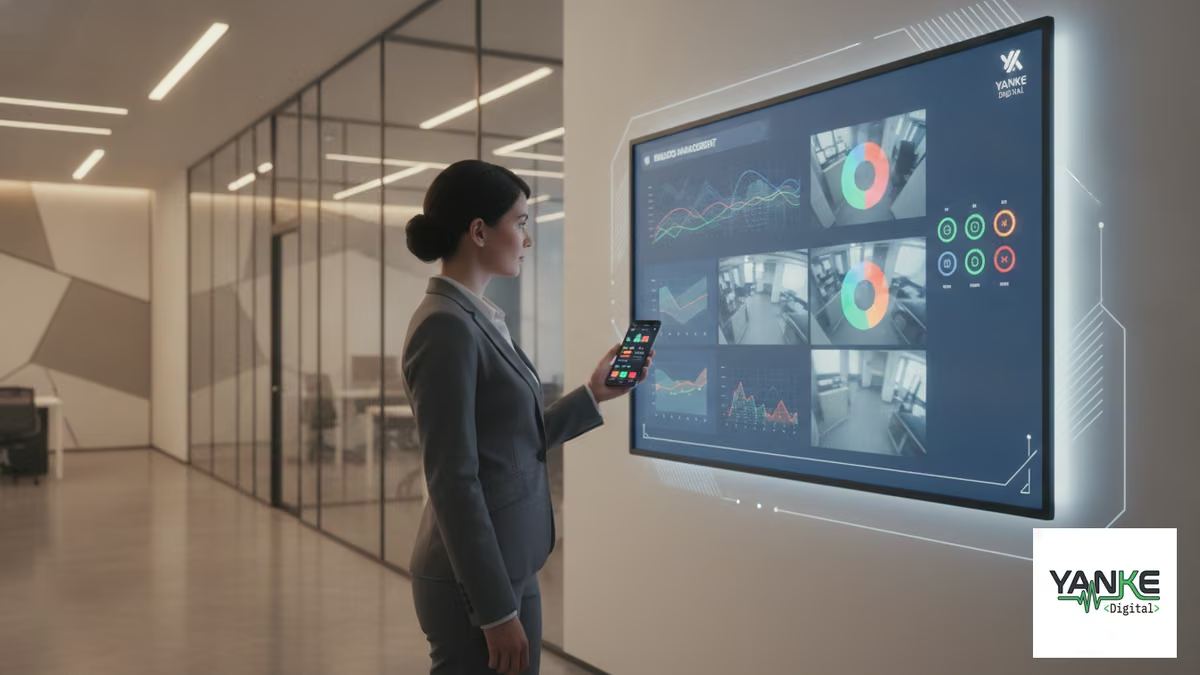
When you’re managing a smart building, the interface you choose—mobile app or web dashboard—shapes how efficiently you control everything. A smart building mobile app vs web dashboard decision isn’t just about preference; it’s about matching your workflow, your team’s habits, and the specific tasks you need to accomplish. Both have real strengths. Both have real limits. The right choice depends on understanding what each does best and how your property actually operates.
Why This Choice Matters for Smart Buildings
Smart building management isn’t one-size-fits-all. A property manager closing up at night has different needs than a facilities team troubleshooting a network issue from a desk. A resident checking their apartment’s temperature remotely needs something different than a commercial building’s security officer monitoring access logs.
The interface you use becomes the bridge between your intentions and your building’s systems. A poor choice creates friction: missed alerts, slower response times, or controls that don’t fit how you actually work. A thoughtful choice—or better yet, a combination of both—turns management into something that feels natural and reliable.
This is especially true in Saskatchewan’s climate and business environment, where property managers often juggle multiple responsibilities and need to respond quickly to changing conditions. Whether you’re managing a residential building in Saskatoon or a commercial property across the province, the right interface can mean the difference between proactive management and reactive scrambling.
Mobile App Control: Convenience and Immediacy
A mobile app puts your building’s controls in your pocket. That’s powerful. It’s also why mobile apps have become the default expectation for smart home and building management.
Real Strengths of Mobile Apps
- Instant access from anywhere. Check your building’s status, unlock a door, or adjust climate control without being at a desk. This matters when you’re on-site at another property, at home after hours, or traveling.
- Push notifications keep you alert. A water sensor detects a leak. A door opens unexpectedly. An alarm triggers. The app notifies you immediately, letting you respond before a small issue becomes expensive.
- Touchscreen controls feel natural. Tapping a button to adjust lighting or confirm access is faster than navigating a web menu, especially when you’re moving through your building.
- Works offline or on poor connections. Mobile apps can cache data and function with limited connectivity—useful in older buildings or areas with spotty WiFi.
- Biometric security is built-in. Fingerprint or face recognition on your phone adds a layer of security without extra passwords.
Where Mobile Apps Fall Short
- Small screens limit visibility. Reviewing 12 camera feeds, analyzing historical data, or comparing multiple sensor readings is cramped on a phone. You’re zooming, scrolling, and losing context.
- Complex tasks become tedious. Setting up a new automation routine, configuring user permissions, or troubleshooting a network issue is painful on a mobile interface.
- Battery and connectivity are constraints. Your phone dies, you lose signal, or you forget it at home. Suddenly you’re locked out of your building’s controls.
- Updates and compatibility issues. Mobile apps require regular updates, and older phones may not support the latest version. Web apps avoid this friction.
- Team collaboration is harder. Sharing screens, reviewing data together, or handing off information to a colleague is clunky on a phone.
Web Dashboard: Power and Perspective
A web dashboard runs in your browser on any device with a screen and internet connection. It’s where you go when you need to see the full picture, dig into data, or make changes that affect how your building operates.
Real Strengths of Web Dashboards
- Large screens show more at once. View multiple camera feeds simultaneously, compare sensor data across zones, or review access logs without constant scrolling. Context matters, and a monitor gives you it.
- Complex workflows are manageable. Setting up automations, configuring user roles, managing integrations, or troubleshooting systems is designed for a keyboard and mouse. These tasks are faster and less error-prone.
- Data analysis and reporting are practical. Historical trends, energy consumption patterns, security events—a dashboard lets you export, filter, and understand your building’s behavior over time.
- No app installation or updates needed. Log in from any computer, any browser, any location. No version conflicts, no storage limits, no compatibility headaches.
- Team access and permissions are cleaner. Assign different roles to different team members, audit who did what and when, and manage access without passing phones around.
- Works reliably on any internet connection. A stable WiFi or wired connection is all you need. No battery drain, no phone notifications interrupting your focus.
Where Web Dashboards Fall Short
- You need to be at a desk or have a laptop. Responding to an alert while you’re walking through your building means finding a computer or pulling out a laptop. That delay can matter.
- Notifications are less intrusive. You might miss an alert if you’re not actively watching the dashboard. Email or SMS alerts help, but they’re not as immediate as a phone notification.
- Requires stable internet. A network outage means you’re locked out. Mobile apps can sometimes work around this; web dashboards cannot.
- Overkill for simple tasks. Checking if a door is locked or adjusting one room’s temperature doesn’t need a full dashboard. A quick app tap is faster.
- Setup and access can be more complex. Logging in, remembering passwords, managing browser security—these friction points are real, especially for less tech-savvy team members.
Smart Building Mobile App vs Web Dashboard: Direct Comparison
Here’s how they stack up across the tasks that matter most in building management:
| Task | Mobile App | Web Dashboard |
|---|---|---|
| Quick access from anywhere | ✓ Excellent | △ Requires device |
| Real-time alerts | ✓ Excellent | △ Good |
| Viewing multiple data streams | △ Limited | ✓ Excellent |
| Complex configuration tasks | △ Difficult | ✓ Excellent |
| Data analysis and reporting | △ Limited | ✓ Excellent |
| Team collaboration | △ Difficult | ✓ Excellent |
| Works without internet | △ Partial | ✗ No |
| No installation required | △ App download needed | ✓ Excellent |
Different Roles, Different Needs
The best interface depends on who’s using it and what they’re trying to accomplish. Here’s how different building roles typically benefit from each:
Property Managers
Property managers juggle multiple buildings, tenant issues, and maintenance schedules. They need both. A mobile app keeps them responsive to emergencies and alerts while they’re moving between properties. A web dashboard lets them review reports, analyze trends, and plan maintenance during office hours. The combination is powerful: alerts on the phone, deep analysis on the desktop.
Facilities and Maintenance Teams
These teams are often on-site, troubleshooting issues in real time. A mobile app is invaluable—checking a sensor reading, confirming a door lock, or verifying a system status without walking back to the office saves time and frustration. A web dashboard becomes their reference tool for understanding system architecture, reviewing historical data, and planning upgrades.
Security and Access Control
Security officers need immediate visibility and control. A mobile app lets them respond to access requests, review camera feeds, and manage visitor entry from anywhere in the building. A web dashboard gives them the ability to review security logs, audit access patterns, and generate reports for management.
Building Residents (Multi-Unit)
Residents want simplicity and convenience. A mobile app is usually their primary interface—adjusting their apartment’s temperature, unlocking the door, or checking if they left something on. A web dashboard is rarely needed unless they’re power users interested in energy consumption or detailed automation setup.
The Hybrid Approach: Why You Probably Need Both
The smartest buildings don’t choose between a smart building mobile app vs web dashboard. They use both strategically, with each tool handling what it does best.
How to Use Them Together
- Mobile app for immediate action. Respond to alerts, unlock doors, adjust climate control, and check status from anywhere. It’s your first line of response.
- Web dashboard for understanding and planning. Review historical data, set up automations, manage user permissions, and analyze trends. It’s your command center.
- Notifications bridge the gap. The dashboard can send alerts to your phone, pulling you into the app when something needs immediate attention. The app can link to the dashboard for deeper investigation.
- Different team members, different tools. Your facilities technician uses the app on-site. Your property manager uses the dashboard during planning meetings. Your security team uses both depending on the situation.
What to Look for in a Dual-Interface System
- Seamless data sync. Changes made in the app should reflect immediately in the dashboard, and vice versa. No confusion about what’s actually set.
- Consistent controls and logic. The same automation should work the same way whether you’re triggering it from the app or the dashboard. Inconsistency breeds mistakes.
- Role-based access in both places. If someone shouldn’t see certain cameras in the dashboard, they shouldn’t see them in the app either. Security permissions need to be consistent.
- Audit trails across both interfaces. You need to know who did what, when, and from which device. This is critical for security and troubleshooting.
- Offline capability in the app. The mobile app should cache recent data and allow basic controls even if connectivity drops. The dashboard can’t do this, but the app can bridge that gap.
Building Management App Features That Matter
Not all mobile apps are created equal. When evaluating a building automation web dashboard and its companion app, look for these features:
In the Mobile App
- Push notifications for critical alerts (not just email)
- Quick-access shortcuts for your most-used controls
- Camera feeds that load quickly, even on slower connections
- Biometric login (fingerprint or face recognition)
- Offline mode for basic status checks
- Geofencing to trigger automations based on your location
- Voice control integration (Apple Siri, Google Assistant, Amazon Alexa)
In the Web Dashboard
- Customizable widgets and layouts for different user roles
- Advanced filtering and search across all data
- Historical data visualization and trend analysis
- Automation builder with visual logic (no coding required)
- User management with granular permissions
- Audit logs showing every action and who performed it
- Export capabilities for reports and compliance
- API access for custom integrations
Remote Property Monitoring: A Practical Example
Consider a real scenario: a commercial property manager in Saskatoon who oversees three buildings across the city. It’s 6 PM on a Friday, and she’s heading home when her phone buzzes. A water sensor in Building B has detected moisture.
With just a mobile app, she’d see the alert but have limited options. She could call the on-site technician, but they might not be there. She’d have to drive back to the building or wait until Monday to investigate.
With a hybrid system, here’s what happens: The app alerts her immediately. She opens the app and sees the sensor location. She then logs into the web dashboard from her car (or at home) to review the camera feed for that area, check historical moisture data, and see if any related systems have triggered. She can shut off water to that zone remotely if needed, or she can confidently tell the on-call technician exactly what to look for. The issue is contained before it becomes a disaster.
This is why smart building mobile app control and web dashboards work best together. The app gets you there fast. The dashboard gives you the full picture.
Making Your Decision: Questions to Ask
Before choosing an interface—or committing to a system—ask yourself these questions:
- Who will use this system? Are they mostly on-site or remote? Tech-savvy or less comfortable with technology? Do they need to collaborate with others?
- What are the most common tasks? Quick checks and alerts, or complex configuration and analysis? The answer shapes which interface matters more.
- How often do you need to respond to emergencies? If alerts are frequent and time-sensitive, a mobile app with push notifications is essential. If most work is planned, a dashboard might be enough.
- What’s your team’s workflow? Do people work from offices, move between buildings, or work from home? This affects how they’ll actually use the system.
- How important is offline access? In older buildings or areas with connectivity issues, a mobile app’s offline capability can be a lifesaver.
- Do you need to integrate with other systems? A web dashboard with API access is usually better for complex integrations. A mobile app is simpler but more limited.
- What’s your budget and timeline? Building both interfaces takes longer and costs more. Starting with one and adding the other later is a valid approach.
Implementation: Getting It Right
Choosing the right interface is one thing. Implementing it well is another. Here’s what matters:
Start with a Clear Plan
Before you install anything, map out your building’s systems, your team’s roles, and the specific tasks each person needs to accomplish. This clarity prevents buying a system that doesn’t fit how you actually work. At Yanke Digital, we start every project by understanding your space and your priorities—this planning phase is where good decisions happen.
Ensure Compatibility and Integration
Your mobile app and web dashboard need to control the same systems and show the same data. Fragmented interfaces create confusion and mistakes. Make sure your system integrator tests compatibility thoroughly before installation.
Train Your Team Properly
The best interface is useless if people don’t know how to use it. Invest in training that covers both the app and the dashboard, and make sure people understand when to use each one. Good integrators provide this training as part of their service.
Plan for Support and Evolution
Your needs will change. New team members will join. Systems will need updates. Choose a partner who provides ongoing support and can help you evolve your setup as your building grows. Yanke Digital’s approach includes support beyond setup, because good technology needs a partner, not just a vendor.
The Bottom Line: Choose Based on Your Reality
The smart building mobile app vs web dashboard debate doesn’t have a universal winner. The right choice depends on your building, your team, and how you actually work. Most successful smart buildings use both, with each interface handling what it does best.
A mobile app keeps you responsive and connected. A web dashboard gives you control and understanding. Together, they create a system that feels less like technology you’re fighting with and more like a tool that makes your job easier.
If you’re planning a smart building system in Saskatoon or across Saskatchewan, start by mapping your actual workflow. What tasks happen most often? Who needs to do them? When do they need to happen? The answers to these questions will guide you toward the right interface—or the right combination of both.
Ready to explore what’s possible for your building? Start with a conversation about your space and your priorities. We’ll help you design a system that fits how you actually work, with interfaces that make sense for your team and your building’s needs.