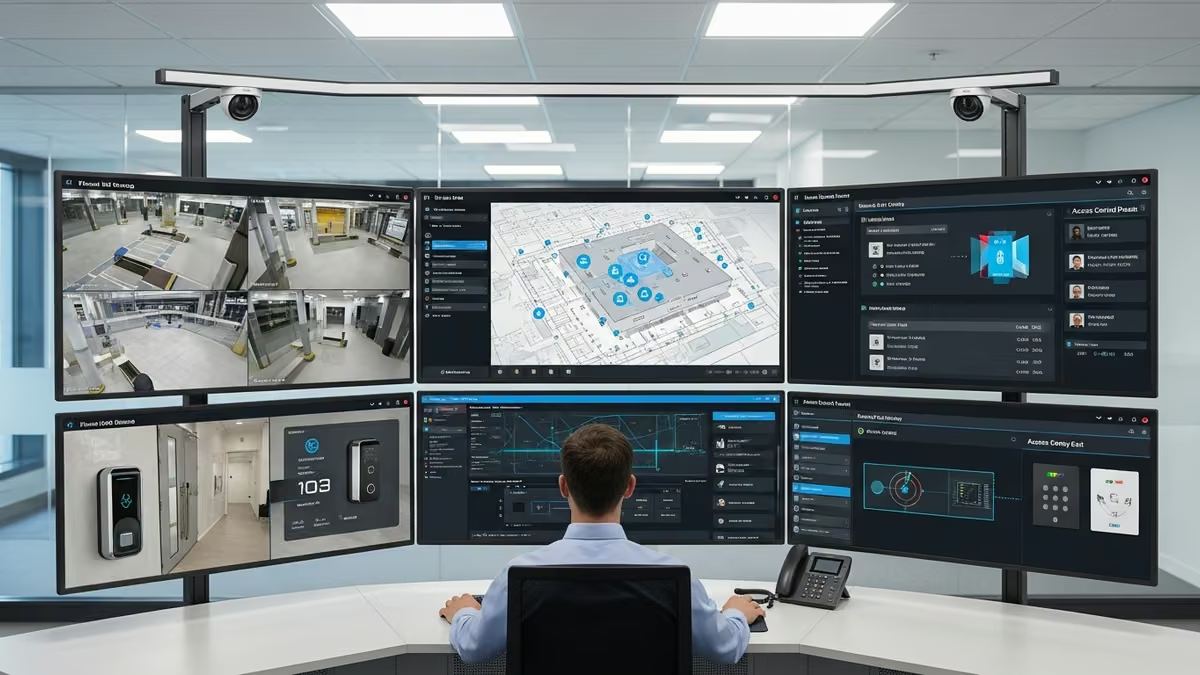
Integrating security cameras with access control systems is no longer a luxury—it’s essential for modern business security. When your security cameras and access control work together seamlessly, you gain unified visibility, faster incident response, and simplified operations. For Saskatchewan businesses managing residential properties, commercial buildings, or multi-dwelling units, a properly integrated security cameras access control integration system transforms how you protect assets and respond to threats.
This guide walks you through everything you need to know about combining these critical security layers into one intelligent ecosystem.
Why Security Cameras & Access Control Integration Matters
Standalone security systems create silos. Your access control logs show who entered a building, but your cameras operate independently. Your alarm system triggers, but there’s no automatic video pull-up. This fragmentation costs time, creates blind spots, and slows emergency response.
When you implement true security cameras access control integration, everything changes:
- Unified incident response: An access denial or alarm trigger automatically pulls relevant camera footage
- Audit trails: Correlate who accessed what, when, and what the cameras saw in real time
- Operational efficiency: One dashboard, one system, one team managing security
- Faster investigations: No more hunting through separate systems to piece together what happened
- Proactive threat detection: Video analytics combined with access patterns reveal suspicious behavior
For Saskatchewan businesses—whether you’re securing a residential complex in Saskatoon, managing a commercial office building, or overseeing multi-dwelling properties—integrated security cameras and access control create a foundation for comprehensive protection.
Key Benefits of Unified Security Systems
Improved Security Posture
A unified security system eliminates gaps. When access control and cameras work together, you’re not relying on a single point of failure. If someone tailgates through a door, the camera catches it. If footage shows suspicious activity, access logs confirm who had authorization. This layered approach significantly strengthens your overall security posture.
Streamlined Operations & Faster Response
Security staff no longer need to toggle between multiple platforms. An integrated system presents all relevant data in one place. When an alarm triggers, the system automatically displays camera feeds from the affected area and access logs from the past hour. Response times drop dramatically, and decision-making becomes faster and more informed.
Cost Efficiency Over Time
While integrated systems require upfront investment in compatible hardware and software, they reduce operational costs significantly. You need fewer monitoring staff, fewer false alarm responses, and less time spent investigating incidents. Over 3-5 years, most organizations see substantial ROI.
Compliance & Audit Support
Many industries require detailed access and surveillance records. Integrated systems automatically create comprehensive audit trails linking access events to video evidence. This simplifies compliance reporting and provides irrefutable documentation during investigations or legal proceedings.
Common Security Cameras Access Control Integration Scenarios
Residential Properties & Multi-Dwelling Units
Apartment buildings and condos benefit enormously from integrated systems. Smart locks at unit entrances sync with lobby cameras. When a resident uses their key fob, the system logs the access and can pull relevant camera footage if needed. Intercom systems integrate with video doorbells, creating a seamless visitor management experience.
Commercial Buildings & Offices
Office environments require granular access control—different employees need different area permissions. When integrated with cameras, you can track who accessed restricted areas and when. Automated alerts notify security if someone enters a zone they’re not authorized for, with instant video confirmation.
Retail & High-Value Asset Protection
Retail locations and businesses storing valuable inventory use integrated systems to prevent theft. Access control restricts who can enter stockrooms or secure areas. Cameras monitor those spaces continuously. If an unauthorized access attempt occurs, cameras capture it immediately, and alerts go to security staff in real time.
Essential Components of an Integrated Security System
Professional-Grade Security Cameras
Your camera system must support integration protocols. Modern IP cameras with cloud connectivity and API access are essential. Look for cameras that offer high resolution, low-light performance, and analytics capabilities. The cameras should integrate with your access control platform through standardized protocols.
Smart Access Control Hardware
Smart locks, card readers, biometric systems, and intercoms form the access layer. These devices must communicate with a central access control platform. Modern systems support multiple authentication methods—keycards, mobile credentials, biometrics, and PIN codes—all logged and traceable.
Centralized Management Platform
The heart of any integrated system is the management software. This platform receives data from cameras, access points, alarms, and sensors. It correlates events, triggers automated responses, and presents unified dashboards. The platform should support role-based access, detailed reporting, and mobile monitoring.
Network Infrastructure
Reliable integration requires robust network infrastructure. All devices must communicate seamlessly. This means proper WiFi coverage, wired connections where possible, network redundancy, and cybersecurity measures to protect your security system from breaches.
Alarm Systems & Environmental Sensors
Modern integrated systems often include alarm systems, flood detection, temperature monitoring, and environmental sensors. When these trigger, the system automatically pulls relevant camera footage and logs access events from the surrounding timeframe, creating a complete incident picture.
How to Implement Security Cameras Access Control Integration
Step 1: Assess Your Current Systems
Start by documenting what you currently have. What cameras are installed? What access control system do you use? Are they from the same manufacturer or different vendors? Do they support API integration? Understanding your baseline helps determine the integration path.
Step 2: Define Your Integration Goals
What do you want to achieve? Faster incident response? Better audit trails? Automated alerts? Reduced staffing needs? Clear goals guide your technology choices and help measure success after implementation.
Step 3: Choose Compatible Platforms
Select a camera system and access control platform that integrate well together. Some manufacturers offer native integration. Others require middleware or third-party integration platforms. Evaluate compatibility, ease of use, support quality, and long-term roadmap before committing.
Step 4: Plan Your Network Architecture
Integrated systems demand reliable networking. Plan your IP camera placement, access point locations, network switches, and backup connectivity. Consider cybersecurity—your security system needs protection from unauthorized access and cyberattacks.
Step 5: Professional Installation & Configuration
This is not a DIY project. Professional integrators understand how to properly configure cameras, access control, and management software to work seamlessly together. They’ll set up automation rules, test failover scenarios, and ensure everything communicates correctly. Yanke Digital specializes in custom security system integration for Saskatchewan businesses, handling everything from design through ongoing support.
Step 6: Staff Training & Documentation
Your team needs to understand the new system. Comprehensive training on the management platform, how to respond to alerts, how to pull footage, and how to generate reports is essential. Good integrators provide detailed documentation and ongoing education.
Step 7: Ongoing Monitoring & Maintenance
Integration doesn’t end at installation. Systems need regular maintenance, software updates, and performance monitoring. Yanke Digital offers 24/7 system support and maintenance to keep your integrated security running reliably.
Integration Considerations & Best Practices
Cybersecurity First
Your security system is a high-value target for hackers. Ensure all devices use strong authentication, encrypted communication, and regular security updates. Segment your security network from general IT infrastructure. Implement firewalls and intrusion detection. Regular security audits are essential.
Scalability & Future-Proofing
Choose systems that grow with your business. Can you add more cameras, access points, or sensors without replacing the entire platform? Does the software support new integrations as technology evolves? Future-proof design ensures your investment remains relevant for years.
Redundancy & Failover
Security systems must be reliable. Implement network redundancy, backup power supplies, and failover systems. If your primary internet connection fails, can the system continue operating? If the main server goes down, do you have backup recording and access control?
Data Retention & Privacy
Determine how long you’ll retain camera footage and access logs. Balance security needs with privacy concerns and storage costs. Ensure your system complies with relevant privacy regulations. Implement role-based access so staff only see data they need.
Automation Rules & Alerts
Configure smart automation. For example: if someone accesses a restricted area without authorization, automatically alert security and pull camera footage. If an alarm triggers, lock all doors and record video from all cameras. Well-designed automation rules multiply the value of your integrated system.
Industry-Leading Platforms for Security Cameras Access Control Integration
Several platforms excel at integrating cameras and access control. While we don’t endorse specific vendors, understanding what’s available helps inform your decision:
- Avigilon Control Center: Comprehensive platform combining video management, access control, and analytics in one interface
- Genetec Security Center: Enterprise-grade unified security platform with strong integration capabilities
- Kisi: Cloud-based access control with camera integration and modern mobile-first design
- Cisco Meraki: Cloud-managed cameras and access control with strong API support for custom integrations
- Milestone XProtect: Video management platform with extensive third-party integrations
Your choice depends on your specific needs, existing infrastructure, budget, and preferred deployment model (cloud vs. on-premise).
Common Integration Challenges & Solutions
Legacy System Incompatibility
Challenge: Older cameras and access control systems may not support modern integration protocols.
Solution: Middleware platforms can bridge legacy and modern systems. Alternatively, plan a phased upgrade where you replace components over time while maintaining functionality.
Network Bandwidth Limitations
Challenge: High-resolution cameras and constant data streams can overwhelm limited network capacity.
Solution: Upgrade network infrastructure, implement video compression, use edge storage on cameras, or deploy local recording with cloud backup.
Vendor Lock-In
Challenge: Proprietary systems make it difficult to switch vendors or add third-party devices.
Solution: Prioritize platforms with open APIs and industry-standard protocols. Ensure contracts include data portability clauses.
Complex Configuration
Challenge: Integrating multiple systems requires technical expertise that in-house staff may lack.
Solution: Partner with professional integrators who understand the technical details and can handle complex configurations. Yanke Digital’s expert integration team specializes in designing and implementing custom security solutions.
Security Cameras Access Control Integration for Different Property Types
Residential Homes
Homeowners benefit from integrated smart locks, video doorbells, and security cameras. When someone rings the doorbell, you see video on your phone and can unlock the door remotely. If motion is detected, cameras start recording and you receive alerts. Integration creates a seamless, user-friendly security experience.
Multi-Dwelling Units (Apartments & Condos)
Multi-family properties need sophisticated integration. Lobby cameras monitor common areas. Unit-level smart locks track resident access. Intercom systems integrate with video doorbells for visitor management. Parking area cameras sync with access control to prevent unauthorized vehicle entry. The system creates a secure, convenient environment for residents while giving management comprehensive oversight.
Commercial Buildings & Offices
Commercial integration is more complex. Different departments need different access levels. Cameras monitor restricted areas like server rooms, executive offices, and data centers. Access logs show who entered sensitive areas and when. Video analytics detect unusual behavior. Automated alerts notify security of policy violations.
Measuring Success: Key Metrics for Integrated Security Systems
After implementing security cameras access control integration, track these metrics to measure effectiveness:
- Incident response time: How quickly does security respond to alerts? Integrated systems typically reduce response time by 40-60%
- False alarm reduction: Better correlation between access events and video reduces false alarms
- Investigation time: How long does it take to investigate incidents? Integration cuts investigation time significantly
- Unauthorized access attempts: Track how many times someone tries to access areas they’re not authorized for
- System uptime: Monitor availability and reliability of your integrated system
- Staff efficiency: Measure time spent on security monitoring and incident response
- Cost per incident: Calculate the cost to investigate and resolve security incidents
Getting Started with Integrated Security in Saskatchewan
If you’re a Saskatchewan business—whether managing residential properties in Saskatoon, operating commercial buildings, or overseeing multi-dwelling units—integrated security cameras and access control should be on your roadmap.
The right integration partner understands your specific needs and designs a system tailored to your property type, budget, and security goals. They handle the technical complexity, ensure everything works seamlessly, and provide ongoing support so your system remains reliable and effective.
Yanke Digital specializes in custom security system design and integration for Saskatchewan properties. Our team works with you to assess your current systems, define your security goals, and implement a unified solution that brings intelligence to your security infrastructure.
Ready to transform your security? Schedule a consultation with our integration experts to discuss how security cameras access control integration can strengthen your property’s protection and simplify your operations.
Conclusion
Security cameras and access control integration is no longer optional for serious security operations. When these systems work together, you gain unified visibility, faster response, better compliance, and ultimately, stronger protection for your assets and occupants.
The integration process requires careful planning, compatible technology, professional installation, and ongoing support. But the benefits—improved security posture, operational efficiency, cost savings, and peace of mind—make it a worthwhile investment for any Saskatchewan business.
Whether you’re just starting to explore integration or upgrading an existing system, partnering with experienced integrators ensures you get a solution that’s secure, scalable, and tailored to your unique needs.