Smart lock systems residential commercial properties are transforming how businesses and homeowners manage access, security, and convenience. Whether you’re protecting a single-family home, managing a multi-unit residential building, or securing a commercial office, the right smart lock system offers keyless access control, remote management, and integration with your broader security ecosystem. At Yanke Digital, we’ve designed and installed hundreds of smart lock solutions across Saskatchewan—and we know that choosing the right system requires understanding your specific needs, compatibility requirements, and long-term security goals.
This guide walks you through everything you need to know about smart lock systems, from evaluating different technologies to understanding installation requirements and integration capabilities.
What Are Smart Lock Systems and Why They Matter
Smart lock systems are electronic access control devices that replace traditional mechanical locks with keyless entry mechanisms. They allow property owners and managers to grant, monitor, and revoke access remotely—without physical keys.
For residential properties, smart locks eliminate the need to hide spare keys, simplify guest access, and provide real-time notifications when doors are locked or unlocked. For commercial buildings, they offer audit trails, temporary access codes for contractors, and integration with building management systems.
The core advantage of smart lock systems is control. You’re no longer dependent on physical keys, and you gain visibility into who enters your property and when—critical for both security and operational efficiency.
Types of Smart Lock Systems for Residential & Commercial Use
Deadbolt Smart Locks
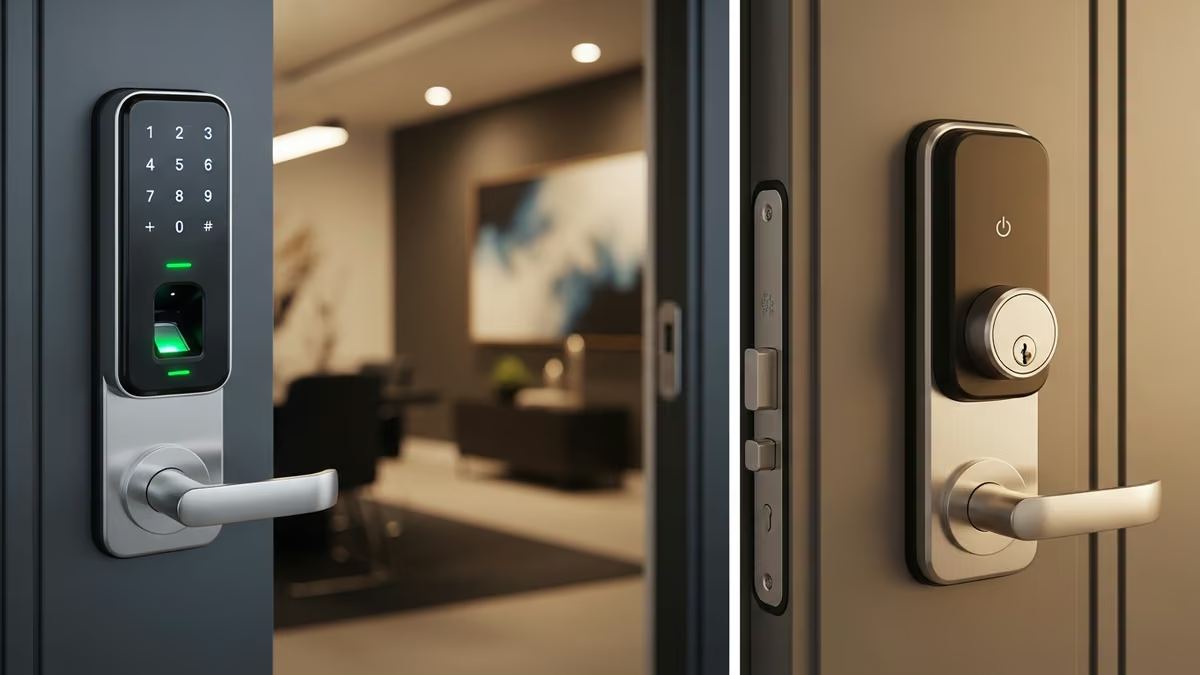
Deadbolt smart locks are the most common residential solution. They replace your existing deadbolt with an electronic version that operates via PIN code, mobile app, or biometric authentication. Popular brands include Yale Assure Lock and Schlage Encode.
Best for: Single-family homes, apartments, and small commercial offices where retrofitting existing doors is preferred.
Smart Door Handle Locks
These replace the entire door handle with an integrated smart lock mechanism. They’re sleeker than deadbolts and often include built-in features like video doorbells or intercoms.
Best for: Modern commercial buildings, new construction, and properties where aesthetics matter as much as functionality.
Invisible/Hidden Smart Locks
These locks operate behind the door without visible hardware changes. The Level Lock Pro is a leading example—it installs inside the door frame and operates the existing deadbolt electronically.
Best for: Rental properties, historic homes, or commercial spaces where you can’t modify the door hardware.
Commercial Access Control Systems
Enterprise-grade smart lock systems designed for multi-door installations. These integrate badge readers, biometric scanners, and centralized management platforms for buildings with dozens or hundreds of access points.
Best for: Office buildings, apartment complexes, warehouses, and facilities requiring audit trails and role-based access management.
Key Features to Evaluate in Smart Lock Systems
Authentication Methods
Different smart lock systems offer different ways to unlock:
- Mobile App: Unlock via smartphone from anywhere with internet connectivity
- PIN Code: Enter a numeric code at the lock itself
- Biometric: Fingerprint or facial recognition for hands-free access
- RFID/NFC: Tap a card or fob to unlock
- Temporary Access Codes: Generate one-time or time-limited codes for guests or contractors
For residential use, mobile app + PIN code is standard. For commercial properties, you’ll want biometric and RFID options for higher security and audit compliance.
Connectivity and Integration
Smart lock systems must communicate with your home or building network. Common connectivity options include:
- Wi-Fi Direct: Connects to your home/office network for remote access
- Bluetooth: Works within range but requires a hub for remote access
- Z-Wave/Zigbee: Low-power mesh networks ideal for multi-lock installations
- Proprietary Systems: Some commercial systems use dedicated networks for security
Integration with platforms like Apple HomeKit, Google Home, or Amazon Alexa matters if you’re building a broader smart home ecosystem. For commercial properties, integration with building management systems (BMS) and security platforms is essential.
Battery Life and Backup Power
Smart locks are battery-powered. Most residential locks run 6-12 months on AA or AAA batteries. Commercial systems may use larger batteries or hardwired power.
Look for systems with low-battery alerts and emergency backup options (like temporary mechanical keys or external power ports) in case batteries die unexpectedly.
Durability and Weather Resistance
Exterior locks must withstand temperature fluctuations, moisture, and physical wear. Check for IP ratings (water/dust resistance) and operating temperature ranges. Commercial-grade locks typically offer better durability than consumer models.
Smart Lock Systems for Residential Properties
Residential smart lock systems prioritize ease of use, aesthetic appeal, and integration with consumer smart home platforms.
Single-Family Homes
For single-family homes, a deadbolt smart lock paired with a video doorbell creates a complete access control solution. You can unlock the door remotely for family members or service providers, receive notifications when doors are accessed, and review video footage of visitors.
Integration with your home’s Wi-Fi network and smart home hub (Apple HomeKit, Google Home, or Alexa) allows voice-activated unlocking and automation—like automatically unlocking the door when you arrive home.
Apartments and Condos
Apartment dwellers often face restrictions on door modifications. Invisible smart locks or retrofit deadbolts work within lease agreements. Some buildings install smart lock systems at the main entrance and unit doors, managed by the property management company.
Multi-unit residential buildings benefit from centralized access management—residents can receive temporary access codes, and management can audit entry logs for security investigations.
Smart Lock Systems for Commercial Properties
Commercial smart lock systems demand higher security, scalability, and integration with broader building systems.
Office Buildings
Modern office buildings use smart lock systems to control access to individual offices, conference rooms, server rooms, and secure areas. Integration with employee badge systems and visitor management platforms streamlines operations.
Features like time-based access (locks that automatically engage after hours), audit trails (detailed logs of who accessed which doors and when), and integration with security cameras create a comprehensive access control ecosystem.
Multi-Dwelling and Apartment Complexes
Large residential complexes require centralized management of dozens or hundreds of locks. Smart lock systems allow property managers to:
- Issue temporary access codes for maintenance staff and contractors
- Monitor entry to common areas (lobbies, gyms, parking garages)
- Revoke access instantly if a resident moves out
- Generate reports for security audits and compliance
Integration with intercom systems and video surveillance creates a unified security platform.
Retail and Hospitality
Retail stores and hotels use smart lock systems to control access to back-of-house areas, storage rooms, and guest rooms. For hotels, smart locks enable keyless check-in—guests receive a temporary access code or mobile key instead of a physical key card.
Installation and Integration Considerations
Professional Installation vs. DIY
While some residential smart locks are DIY-friendly, professional installation ensures proper setup, security configuration, and integration with your broader smart home or building system.
For commercial properties, professional installation is non-negotiable. Improper configuration can create security vulnerabilities, and integration with building management systems requires technical expertise.
At Yanke Digital, we handle the complete installation process—from assessing your property’s needs to configuring access rules, testing failover systems, and training your team on daily operations.
Network and Connectivity Setup
Smart lock systems require reliable network connectivity. We ensure your Wi-Fi network has adequate coverage at all entry points and that your system has redundancy (backup connectivity) in case your primary internet connection fails.
For commercial properties, we often recommend dedicated networks or mesh systems to ensure consistent performance across multiple locks.
Integration with Security Systems
Smart lock systems work best as part of a complete security ecosystem. Integration with security alarm systems, surveillance cameras, and access control platforms creates a unified platform where all your security data flows into one dashboard.
For example, when a smart lock is triggered, it can automatically arm/disarm your alarm system, activate nearby cameras, and log the event for audit purposes.
Security Best Practices for Smart Lock Systems
Strong Authentication and Access Control
Use strong PIN codes (avoid sequential numbers or birthdates), enable two-factor authentication on your mobile app, and regularly rotate temporary access codes for contractors or guests.
For commercial properties, implement role-based access control—different employees have access to different areas based on their job function.
Regular Firmware Updates
Smart lock manufacturers regularly release firmware updates that patch security vulnerabilities. Ensure your system is configured to update automatically or establish a schedule for manual updates.
Audit Logging and Monitoring
Enable detailed logging of all access events. Review logs regularly for unusual activity—like multiple failed unlock attempts or access at unusual hours.
For commercial properties, integrate access logs with your security operations center (SOC) or security monitoring service for real-time alerts.
Backup and Failover Systems
Smart locks should have mechanical backup options (like emergency keys) and battery backup power. For critical commercial applications, consider redundant locks or failover systems that automatically unlock in case of system failure.
Cost Considerations for Smart Lock Systems
Smart lock system costs vary widely based on the type, features, and scale of installation:
- Residential Deadbolts: $150–$400 per lock (hardware only)
- Smart Door Handles: $300–$600 per lock
- Commercial Access Control Systems: $500–$2,000+ per lock, plus software licensing and integration costs
- Professional Installation: $100–$300 per lock
For multi-lock installations, costs scale, but per-lock pricing often decreases. Commercial systems may include ongoing software licensing, cloud storage for access logs, and support fees.
Consider the long-term value: smart lock systems reduce lost key costs, improve security, and provide operational efficiency that justifies the upfront investment.
Choosing the Right Smart Lock System for Your Needs
Selecting the right smart lock system requires evaluating your property type, security requirements, budget, and integration goals.
For Residential Properties
Start with a single smart deadbolt paired with a video doorbell. Ensure it integrates with your preferred smart home platform (Apple HomeKit, Google Home, or Alexa). As you expand, add smart locks to other entry points and integrate with your broader smart home ecosystem.
For Commercial Properties
Work with a system integrator (like Yanke Digital) to assess your building’s access control needs. Consider the number of doors, types of users (employees, visitors, contractors), compliance requirements (healthcare, finance, government), and integration with existing building systems.
Enterprise-grade smart lock systems offer better scalability, security, and support than consumer products.
Why Partner With Yanke Digital for Smart Lock System Installation
At Yanke Digital, we don’t just install smart lock systems—we design complete access control solutions tailored to your property and security goals.
Our process includes:
- Comprehensive Assessment: We evaluate your property, security needs, and existing systems to recommend the right smart lock solution
- Custom Design: We design a system that integrates seamlessly with your security cameras, alarm systems, and smart home platform
- Professional Installation: Our certified technicians handle all hardware installation, network setup, and configuration
- Training and Support: We train your team on daily operations and provide ongoing support and maintenance
- Future-Proof Design: We design systems with flexibility to grow and adapt as your needs change
Whether you’re a homeowner in Saskatoon looking to upgrade your residential security or a commercial property manager across Saskatchewan, we have the expertise to design and install smart lock systems that work.
Check out our smart locks service page or explore our security and access control solutions to learn more about how we can help.
Ready to Upgrade Your Access Control?
Smart lock systems offer convenience, security, and operational efficiency for residential and commercial properties. Whether you’re protecting a single home or managing a multi-building complex, the right system simplifies access management and integrates seamlessly into your broader security ecosystem.
Let’s discuss how Yanke Digital can design a custom smart lock solution for your property. Schedule a consultation today by calling 1-888-698-8001 or visiting our contact page to get started.
Your security, simplified.