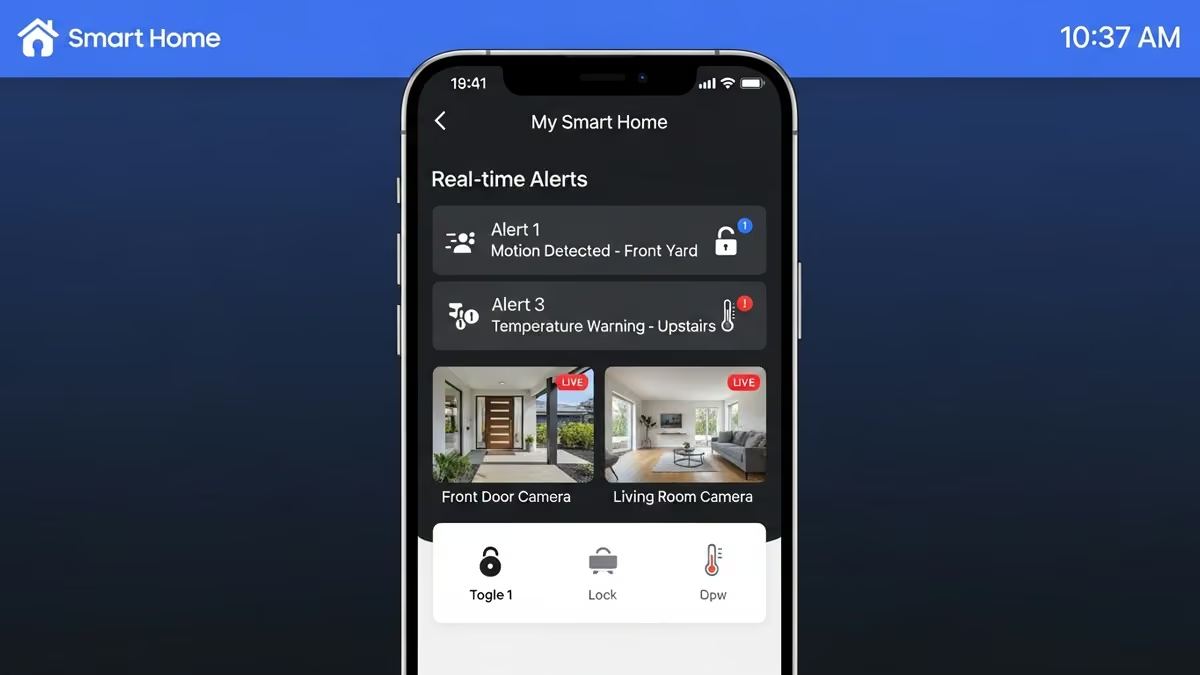
Busy homeowners and property managers need visibility and control—even when they’re away. A smart home mobile app remote control system delivers exactly that: real-time alerts, instant access to security cameras, locks, thermostats, and environmental sensors from your smartphone. Whether you’re at work, traveling, or managing multiple properties, mobile app control transforms how you interact with your home or commercial space. This guide covers everything you need to know about smart home mobile app remote control real-time alerts, how they work, and why they matter for modern living.
What Is Smart Home Mobile App Remote Control?
Smart home mobile app remote control is a centralized smartphone application that lets you manage connected devices across your property from anywhere with an internet connection. Unlike traditional systems that require you to be physically present, a smart home mobile app remote control system puts your entire ecosystem in your pocket.
These apps connect to your smart home hub or cloud-based platform and communicate with individual devices—cameras, locks, thermostats, sensors, and alarms. You can arm security systems, unlock doors, adjust temperature, view live camera feeds, and receive real-time alerts instantly.
Core Features of Smart Home Mobile Apps
- Live camera feeds: View security cameras in real-time from your phone
- Remote device control: Lock/unlock doors, adjust thermostats, turn lights on/off
- Real-time alerts: Instant notifications for motion detection, door openings, temperature changes, water leaks
- System automation: Create schedules and routines that run automatically
- User management: Grant access to family members, tenants, or staff with customizable permissions
- Activity logs: Review who accessed what and when for security auditing
- Integration: Connect multiple device brands into one unified interface
Why Real-Time Alerts Matter for Smart Home Mobile App Control
Real-time alerts are the backbone of effective smart home mobile app remote control. They transform your system from passive monitoring to active protection and awareness.
Security & Peace of Mind
Instant notifications when motion is detected, doors are opened, or windows are breached give you immediate awareness. You can respond in seconds—lock a door remotely, contact authorities, or check a camera feed—rather than discovering a problem hours later.
Property Protection
Water leak sensors and flood detection systems send alerts the moment moisture is detected. Temperature monitoring alerts warn you of HVAC failures or freezing conditions. These early warnings prevent thousands in property damage.
Operational Efficiency
For commercial properties and multi-dwelling units, real-time alerts keep facility managers informed. Unauthorized access attempts, temperature anomalies, or system failures trigger instant notifications so issues are addressed before they escalate.
Key Benefits of Smart Home Mobile App Remote Control Systems
Control From Anywhere
Whether you’re at the office, on vacation, or across the country, your smart home mobile app remote control gives you the same access as if you were home. Forgot to lock the door? Check and secure it from your phone. Need to let a contractor in? Unlock remotely and monitor their activity.
Convenience & Comfort
Adjust your thermostat before you arrive home. Turn on lights remotely. Unlock your smart lock without fumbling for keys. These conveniences add up to a more comfortable, efficient lifestyle.
Enhanced Security
Smart locks, intercoms, and camera systems integrated into one mobile app remote control interface create a comprehensive security layer. You see who’s at your door, control access, and have video evidence of all activity.
Energy Efficiency
Monitor and adjust climate control remotely. Receive alerts if your thermostat detects unusual temperature swings. Optimize heating and cooling schedules based on occupancy patterns, reducing energy waste and lowering utility bills.
Property Management at Scale
For landlords and property managers, a smart home mobile app remote control system simplifies multi-property oversight. Monitor dozens of units from one dashboard, respond to tenant requests instantly, and track maintenance issues in real-time.
Essential Devices for Smart Home Mobile App Remote Control
Smart Locks & Access Control
Smart locks are foundational to mobile app control. They let you lock/unlock doors remotely, grant temporary access codes to guests or service providers, and receive notifications whenever someone enters or exits. Intercoms add two-way audio communication, letting you speak with visitors before granting access.
Security Cameras & Doorbells
Professional-grade security cameras integrated with your smart home mobile app remote control system provide live feeds and recorded footage accessible from your phone. Smart doorbells let you see and speak with visitors in real-time, even when you’re away.
Smart Thermostats & Temperature Monitoring
Intelligent thermostats let you adjust temperature remotely and receive real-time alerts if your HVAC system malfunctions or if temperature drops below a safe threshold. This is critical for protecting pipes in winter or maintaining server room conditions in commercial spaces.
Flood & Water Detection Sensors
Water leak sensors placed near water heaters, under sinks, and in basements send instant alerts to your mobile app remote control interface the moment moisture is detected. Early detection prevents catastrophic water damage.
Environmental Sensors
Air quality sensors, humidity monitors, and motion detectors feed data to your app, triggering alerts and automations. These sensors help maintain optimal conditions for comfort, health, and security.
How Smart Home Mobile App Remote Control Real-Time Alerts Work
Understanding the mechanics of smart home mobile app remote control real-time alerts helps you configure them effectively.
The Alert Flow
- Event trigger: A sensor detects motion, a door opens, temperature drops, or water is detected
- Hub processing: Your smart home hub receives the signal and evaluates it against your rules
- Cloud transmission: The hub sends the alert to the cloud platform
- App notification: Your smartphone receives a push notification instantly
- Your response: You view the alert, check camera feeds, and take action remotely
Customizing Alerts
Most smart home mobile app remote control systems let you customize which alerts you receive, when you receive them, and how (push notification, email, SMS). You can set quiet hours, create different alert profiles for different times of day, and prioritize critical alerts.
Smart Home Mobile App Remote Control for Different Property Types
Residential Homes
Homeowners use smart home mobile app remote control systems to manage security, comfort, and convenience. Lock doors before guests arrive, adjust the thermostat before coming home, and receive alerts if motion is detected while you’re away. For families with multiple properties or vacation homes, centralized mobile app control is invaluable.
Multi-Dwelling Units (Apartments & Condos)
Property managers use smart home mobile app remote control to oversee dozens of units simultaneously. Receive alerts for unauthorized access attempts, maintenance issues, or tenant requests. Grant temporary access to maintenance staff and contractors, then revoke it automatically. Monitor common areas with cameras and sensors.
Commercial Buildings
Offices, retail spaces, and industrial facilities benefit from comprehensive smart home mobile app remote control systems. Facility managers monitor access control, surveillance, climate systems, and environmental conditions. Real-time alerts for after-hours motion, temperature anomalies, or security breaches enable rapid response.
Integration & Compatibility Considerations
Not all smart devices work seamlessly together. A well-designed smart home mobile app remote control system integrates devices from multiple manufacturers into one unified interface.
Platform Compatibility
Look for systems that support popular platforms like Apple HomeKit, Google Home, Alexa, and Zigbee. This ensures your smart home mobile app remote control system can expand as you add new devices without compatibility headaches.
Cloud vs. Local Control
Cloud-based smart home mobile app remote control systems offer remote access from anywhere but depend on internet connectivity. Local control systems work even if your internet goes down but limit remote access. Hybrid approaches offer the best of both worlds.
Professional Integration
Rather than cobbling together consumer devices, professional system integrators design custom smart home mobile app remote control solutions tailored to your specific needs. They ensure all devices communicate reliably, configure alerts intelligently, and provide ongoing support. Yanke Digital specializes in custom smart home design and integration for residential, multi-dwelling, and commercial properties across Saskatchewan.
Security & Privacy in Smart Home Mobile App Remote Control
Giving yourself remote access to your home or business means security is paramount. Your smart home mobile app remote control system handles sensitive data and controls critical infrastructure.
Encryption & Authentication
Ensure your smart home mobile app remote control platform uses end-to-end encryption for all communications. Multi-factor authentication (MFA) adds an extra layer—even if someone gets your password, they can’t access your system without a second verification step.
User Access Control
Granular permissions let you grant specific access to family members, tenants, or staff. One person might control only the thermostat, another only the front door lock. Activity logs show exactly who did what and when.
Regular Updates & Maintenance
Smart home mobile app remote control systems require regular firmware updates to patch security vulnerabilities. Professional integrators handle these updates automatically, keeping your system secure without disrupting your daily life.
Choosing the Right Smart Home Mobile App Remote Control Solution
Not all smart home mobile app remote control systems are created equal. Here’s what to evaluate:
- Ease of use: Can you and your family/staff actually use the app without frustration?
- Reliability: Does the system respond instantly, or do you experience lag?
- Alert customization: Can you fine-tune which alerts you receive and when?
- Device compatibility: Does it work with the brands and devices you already own or plan to buy?
- Scalability: Can the system grow as your needs change?
- Support: Is professional support available 24/7 if something breaks?
- Future-proofing: Is the platform actively developed, or is it becoming obsolete?
Common Challenges & How to Overcome Them
Internet Dependency
Smart home mobile app remote control requires a stable internet connection. If your internet goes down, remote access stops. Solution: Ensure your home or business has redundant internet (backup cellular connection) and consider a system with local control fallback.
Alert Fatigue
Too many alerts lead to notification overload. You start ignoring them. Solution: Configure smart alerts that only notify you of truly important events. Use time-based rules (no motion alerts during business hours, for example).
Device Compatibility Issues
Mixing devices from different manufacturers can create integration headaches. Solution: Work with a professional integrator who understands device compatibility and can design a cohesive ecosystem.
Complexity & Learning Curve
Advanced smart home mobile app remote control systems have steep learning curves. Solution: Choose a system with intuitive design, and ensure your integrator provides thorough training and documentation.
Smart Home Mobile App Remote Control: Real-World Use Cases
The Busy Professional
Sarah works long hours and travels frequently. Her smart home mobile app remote control system lets her lock the front door if she forgot, check if the garage door is closed, and receive alerts if motion is detected while she’s away. She adjusts the thermostat before arriving home so it’s comfortable when she walks in.
The Property Manager
James manages 15 apartment units. His smart home mobile app remote control dashboard shows all units at a glance. He receives alerts for maintenance issues, grants temporary access codes to contractors, and monitors common areas with cameras. What used to take hours of phone calls and site visits now takes minutes.
The Vacation Home Owner
The Martinez family owns a cabin three hours away. Their smart home mobile app remote control system alerts them if the temperature drops (preventing frozen pipes), if motion is detected (security), or if water is leaking. They can lock/unlock the door remotely for guests and monitor cameras to ensure everything is secure.
The Future of Smart Home Mobile App Remote Control
Smart home technology evolves rapidly. Emerging trends in smart home mobile app remote control include:
- AI-powered alerts: Machine learning distinguishes between important events and false alarms
- Voice control integration: Control your system via voice commands through your phone
- Predictive automation: Systems learn your patterns and automate routines without manual setup
- Enhanced privacy: On-device processing keeps sensitive data local rather than sending it to the cloud
- Wearable integration: Smartwatches and fitness trackers become control interfaces
A future-proof smart home mobile app remote control system is designed with flexibility in mind, ready to adapt as technology evolves.
Getting Started: Implementation Steps
1. Assess Your Needs
What do you want to control and monitor? Security cameras? Climate? Access control? Water detection? List your priorities.
2. Evaluate Platforms
Research smart home mobile app remote control platforms that support your desired devices and use cases.
3. Consult a Professional
Rather than DIY, work with a professional integrator. They design systems tailored to your space, ensure reliable integration, and provide ongoing support. Yanke Digital offers custom smart home design and integration services for residential and commercial properties.
4. Install & Configure
Professional installation ensures all devices are properly placed, connected, and configured. Your integrator sets up alerts, automations, and user access.
5. Train & Support
Your integrator trains you and your team on using the smart home mobile app remote control system effectively. Ongoing support ensures the system runs reliably.
Why Professional Integration Matters for Smart Home Mobile App Remote Control
DIY smart home setups often fail because devices don’t communicate reliably, alerts aren’t configured intelligently, and there’s no support when something breaks. Professional integrators like Yanke Digital design complete, custom smart home mobile app remote control solutions that actually work.
We don’t just install products—we design systems. We understand your specific needs, select compatible devices, integrate them seamlessly, configure alerts intelligently, and provide ongoing support. Our commercial smart home solutions and residential services ensure your system is reliable, secure, and future-proof.
Ready to Transform Your Space With Smart Home Mobile App Remote Control?
Smart home mobile app remote control real-time alerts put your property in your pocket. Whether you’re a busy homeowner, property manager, or business owner, the right system delivers peace of mind, convenience, and control.
Yanke Digital specializes in designing and installing custom smart home solutions for residential homes, multi-dwelling units, and commercial buildings across Saskatchewan. We handle everything from device selection and integration to configuration and ongoing support.
Ready to get started? Schedule a consultation with Yanke Digital today. We’ll assess your needs, design a custom smart home mobile app remote control system, and help you take control of your property from anywhere.
Call us at 1-888-698-8001 or visit our website to learn more about our smart home integration services.