When critical building systems fail, the consequences ripple through operations, tenant safety, and your bottom line. Disaster recovery smart building backup systems are no longer optional—they’re essential infrastructure for any organization managing residential, commercial, or multi-dwelling properties. At Yanke Digital, we design custom smart building solutions that keep your systems running even when the unexpected happens.
This guide explores how disaster recovery smart building backup systems protect your operations, the key components you need, and how to implement a resilient strategy that works for your specific space.
What Are Disaster Recovery Smart Building Backup Systems?
Disaster recovery smart building backup systems are integrated technology solutions designed to maintain critical building functions during emergencies, power outages, network failures, or other disruptions. Unlike traditional backup approaches that focus solely on data, these systems protect the entire operational ecosystem—security, climate control, access management, surveillance, and emergency communications.
A comprehensive disaster recovery smart building backup system includes:
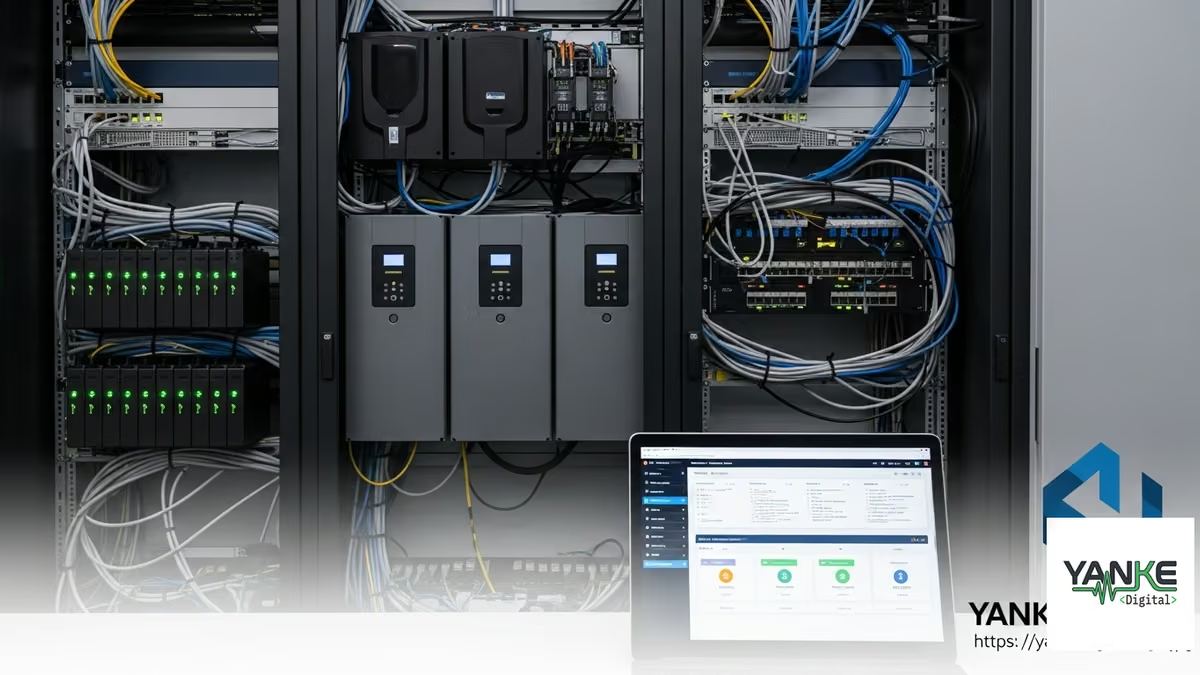
- Uninterruptible Power Supply (UPS) – Maintains power to critical systems during outages
- Redundant Network Architecture – Backup internet connectivity and failover protocols
- Battery Backup for Access Control – Ensures smart locks and intercoms remain operational
- Cloud-Based System Replication – Protects configuration data and system settings
- Emergency Lighting Integration – Automated backup lighting for safe evacuation
- Failover Security Systems – Alarm systems and cameras continue monitoring
- Environmental Monitoring Redundancy – Temperature, flood detection, and air quality sensors maintain operation
These components work together to create a resilient smart building ecosystem that doesn’t just survive disruptions—it maintains operational continuity and tenant safety.
Why Disaster Recovery Smart Building Backup Systems Matter
Operational Continuity During Critical Events
When a power outage hits, buildings without proper backup systems face cascading failures. Access control systems lock down, security cameras go dark, climate systems stop, and emergency communications fail. For commercial buildings, hospitals, data centers, and multi-dwelling properties, these failures create liability, safety risks, and significant financial losses.
Disaster recovery smart building backup systems ensure that essential functions continue seamlessly. Tenants remain safe, critical operations stay online, and your organization maintains control of the building environment.
Regulatory Compliance and Insurance Requirements
Many jurisdictions and insurance policies now require documented disaster recovery and business continuity plans. Building codes in Saskatchewan and across Canada increasingly mandate backup power for emergency systems, access control, and life safety equipment. Implementing disaster recovery smart building backup systems demonstrates compliance and can reduce insurance premiums.
Tenant Safety and Liability Protection
In residential and multi-dwelling properties, tenants depend on building systems for security, emergency communications, and environmental comfort. A failure in these systems creates liability exposure. Disaster recovery smart building backup systems protect tenants and shield your organization from negligence claims.
Business Continuity and Revenue Protection
For commercial properties, every minute of downtime costs money. Businesses operating in your building lose productivity, clients, and revenue. By maintaining operational continuity through disaster recovery smart building backup systems, you protect tenant relationships and your own income stream.
Key Components of a Resilient Disaster Recovery Strategy
Backup Power and UPS Systems
Uninterruptible Power Supply (UPS) systems are the foundation of disaster recovery smart building backup systems. They provide immediate power during outages, giving your systems time to transition to backup generators or gracefully shut down critical operations.
For smart buildings, UPS systems should protect:
- Access control panels and smart locks
- Security system hubs and alarm panels
- Network equipment (routers, switches, controllers)
- Smart thermostat hubs and climate control systems
- Surveillance system recording devices
- Emergency communication systems
- Building management system (BMS) servers
Yanke Digital designs UPS configurations tailored to your building’s critical systems, ensuring sufficient runtime to maintain operations or execute an orderly shutdown.
Redundant Network Architecture
Smart buildings depend on network connectivity. When your primary internet connection fails, your entire system can become isolated. Disaster recovery smart building backup systems include redundant network paths—such as cellular failover, secondary ISP connections, or mesh network protocols—that automatically activate when primary connectivity is lost.
This ensures that:
- Remote monitoring and management continue uninterrupted
- Cloud-based system data syncs and backups proceed
- Emergency alerts and notifications reach occupants
- Integration with third-party platforms (security monitoring, climate control) remains active
Cloud-Based Configuration Backup and Recovery
Your smart building’s configuration—automation rules, user access permissions, system settings, and integration parameters—is as critical as the hardware itself. Disaster recovery smart building backup systems include automated cloud replication that continuously backs up your system configuration.
If a controller fails or requires replacement, you can restore the entire configuration in minutes rather than hours or days. This minimizes downtime and ensures consistency across your building ecosystem.
Battery Backup for Access Control and Security
Smart locks and access control systems must remain operational during power failures. Disaster recovery smart building backup systems include battery backup modules integrated into smart locks, intercoms, and access control panels. These batteries provide 24-48 hours of operation, allowing occupants to exit safely and authorized personnel to maintain access.
Modern smart locks also support manual override and emergency unlock protocols, ensuring that no one becomes trapped during a system failure.
Failover Surveillance and Monitoring
Security cameras and monitoring systems are critical during emergencies. Disaster recovery smart building backup systems ensure that:
- Cameras continue recording to local storage if cloud connectivity is lost
- Backup power keeps cameras and recording devices operational
- Monitoring services receive alerts through redundant communication channels
- Video footage is automatically synced to cloud storage once connectivity is restored
Environmental Monitoring Redundancy
Flood detection, temperature monitoring, and air quality sensors are critical for protecting property and occupant health. Disaster recovery smart building backup systems include redundant sensors and local data logging, ensuring that environmental threats are detected and logged even if cloud connectivity fails.
Implementing Disaster Recovery Smart Building Backup Systems: A Practical Approach
Step 1: Assess Your Critical Systems
Not all building systems require the same level of backup protection. Start by identifying which systems are truly critical to safety, operations, and compliance. For most buildings, this includes:
- Life safety systems (emergency lighting, alarms, communications)
- Access control and security
- Emergency power systems
- Fire suppression and detection
- HVAC systems (in critical areas)
- Surveillance and monitoring
Yanke Digital works with you to conduct a comprehensive systems audit, identifying which components require backup protection and designing a disaster recovery smart building backup systems strategy that matches your priorities and budget.
Step 2: Design Redundancy Into Your Architecture
Effective disaster recovery smart building backup systems are designed from the ground up with redundancy in mind. This means:
- Multiple communication paths – Primary and backup network connections
- Distributed processing – Local controllers that operate independently if cloud connectivity fails
- Failover automation – Systems automatically switch to backup resources without manual intervention
- Data replication – Critical configuration and operational data is continuously synced to backup locations
Step 3: Select Compatible Hardware and Platforms
Your disaster recovery smart building backup systems must integrate seamlessly with your existing devices and platforms. At Yanke Digital, we work with industry-leading platforms and devices that support robust backup and failover capabilities, including:
- Enterprise-grade access control systems with battery backup
- Smart thermostats and climate control systems with local operation modes
- Security cameras with local recording and cloud sync
- Alarm systems with cellular backup communication
- Network equipment with redundancy features
We ensure that all components work together as a unified system, not as isolated devices.
Step 4: Implement Monitoring and Testing
A disaster recovery smart building backup systems strategy is only effective if you know it works. This requires:
- Continuous monitoring – Real-time alerts if backup systems fail or battery levels drop
- Regular testing – Quarterly or semi-annual failover tests to verify that backup systems activate correctly
- Documentation – Clear procedures for manual failover and recovery if automation fails
- Training – Your team understands how to operate systems during an emergency
Yanke Digital provides ongoing monitoring and maintenance, ensuring your disaster recovery smart building backup systems remain ready at all times.
Step 5: Develop a Recovery Plan
Technology alone isn’t enough. You need a documented disaster recovery and business continuity plan that outlines:
- Roles and responsibilities during an emergency
- Communication protocols for notifying occupants and authorities
- Procedures for manual system operation if automation fails
- Steps for restoring normal operations once the emergency ends
- Contact information for emergency services and system support
This plan should be reviewed annually and tested during disaster recovery drills.
Disaster Recovery Smart Building Backup Systems for Different Property Types
Residential Homes
For single-family homes, disaster recovery smart building backup systems focus on safety and essential comfort. This typically includes battery backup for smart locks, backup power for security systems and flood detection, and cellular connectivity for emergency alerts. The goal is to keep residents safe and secure during power outages or network failures.
Multi-Dwelling Properties (Apartments and Condos)
Multi-dwelling properties require more comprehensive disaster recovery smart building backup systems because failures affect dozens or hundreds of residents. Critical systems include:
- Building-wide access control with battery backup for all entry points
- Emergency lighting and communication systems
- Backup power for security monitoring and surveillance
- Elevator backup power (if applicable)
- Flood detection and water shut-off automation
- HVAC backup for common areas
Yanke Digital designs systems that maintain safety and basic operations across the entire property, even during extended outages.
Commercial Buildings and Offices
Commercial properties have the most demanding disaster recovery smart building backup systems requirements. Businesses operating in your building depend on continuous power, network connectivity, climate control, and security. A comprehensive strategy includes:
- Redundant power systems (UPS + generator)
- Multiple internet connections with automatic failover
- Climate control systems that maintain safe operating temperatures
- Full surveillance and access control redundancy
- Data center or server room backup power
- Emergency communication systems
By maintaining operational continuity, you protect tenant relationships and your own revenue.
Common Challenges in Disaster Recovery Smart Building Backup Systems
Integration Complexity
Many buildings have legacy systems that don’t integrate well with modern smart building technology. Disaster recovery smart building backup systems require seamless integration across all platforms. Yanke Digital specializes in bridging these gaps, creating unified systems that work together reliably.
Cost and Budget Constraints
Comprehensive disaster recovery smart building backup systems require upfront investment. However, the cost of downtime—lost productivity, tenant dissatisfaction, liability exposure—far exceeds the investment in proper backup systems. We help you prioritize critical systems and phase implementation to fit your budget.
Testing and Maintenance
Backup systems only work if they’re properly maintained and regularly tested. Many organizations neglect this critical step. Yanke Digital provides ongoing monitoring, testing, and maintenance to ensure your disaster recovery smart building backup systems remain ready when needed.
User Education
Even the best disaster recovery smart building backup systems fail if occupants don’t understand how to use them during an emergency. We provide training and documentation to ensure your team can operate systems manually if needed.
Best Practices for Maintaining Your Disaster Recovery Smart Building Backup Systems
- Monthly Battery Testing – Verify that UPS and battery backup systems hold a full charge
- Quarterly Failover Tests – Simulate power outages or network failures to verify automatic failover works correctly
- Semi-Annual System Audits – Review configuration, update firmware, and identify potential vulnerabilities
- Annual Disaster Recovery Drills – Test your entire emergency response plan with staff and occupants
- Continuous Monitoring – Real-time alerts for battery degradation, connectivity issues, or system failures
- Documentation Updates – Keep recovery procedures and contact information current
- Professional Support – Partner with a system integrator like Yanke Digital for ongoing maintenance and optimization
How Yanke Digital Designs Disaster Recovery Smart Building Backup Systems
At Yanke Digital, we don’t just install backup equipment—we design complete disaster recovery smart building backup systems tailored to your specific needs. Our approach includes:
- Comprehensive Assessment – We audit your current systems, identify critical functions, and assess vulnerabilities
- Custom Design – We create a disaster recovery strategy that matches your building type, occupancy, and operational requirements
- Seamless Integration – All backup systems integrate with your existing smart building ecosystem, creating one unified, resilient platform
- Expert Installation – Our certified technicians install and configure all components with precision
- Testing and Validation – We thoroughly test your system before handoff, ensuring all failover mechanisms work correctly
- Training and Documentation – We provide comprehensive training and detailed procedures for your team
- Ongoing Support – We monitor your systems 24/7, perform regular maintenance, and conduct quarterly failover tests
Whether you’re in Saskatoon, Saskatchewan, or anywhere across Canada, Yanke Digital brings expertise in designing smart building solutions that keep your operations running, no matter what happens.
Ready to Protect Your Building with Disaster Recovery Smart Building Backup Systems?
Downtime isn’t an option. Whether you manage a residential home, multi-dwelling property, or commercial building, disaster recovery smart building backup systems are essential infrastructure that protects your operations, your tenants, and your bottom line.
Yanke Digital specializes in designing and installing comprehensive disaster recovery solutions that keep your smart building systems running 24/7. We handle the complexity so you can focus on your business.
Schedule a consultation with our team to discuss how disaster recovery smart building backup systems can protect your property. Or call us at 1-888-698-8001 to speak with a system integration specialist.
Let’s design a resilient smart building solution that works for you.