When a power outage strikes, your security system shouldn’t fail. Security system redundancy, backup power, and failover protection are no longer optional features for mission-critical buildings—they’re essential safeguards that keep your property, assets, and occupants protected around the clock. Whether you manage a commercial office, multi-family residential complex, or critical infrastructure, understanding how redundant security systems work can mean the difference between continuous protection and costly downtime.
At Yanke Digital, we design integrated security solutions that prioritize reliability. In this guide, we’ll explore why security system redundancy matters, how backup power systems function, and what failover protection strategies work best for different building types.
What Is Security System Redundancy?
Security system redundancy means building multiple layers of protection so that if one component fails, others automatically take over. It’s not about duplication for its own sake—it’s about ensuring your alarm systems, cameras, access control, and monitoring capabilities remain operational even when primary systems experience downtime.
Redundancy operates across several dimensions:
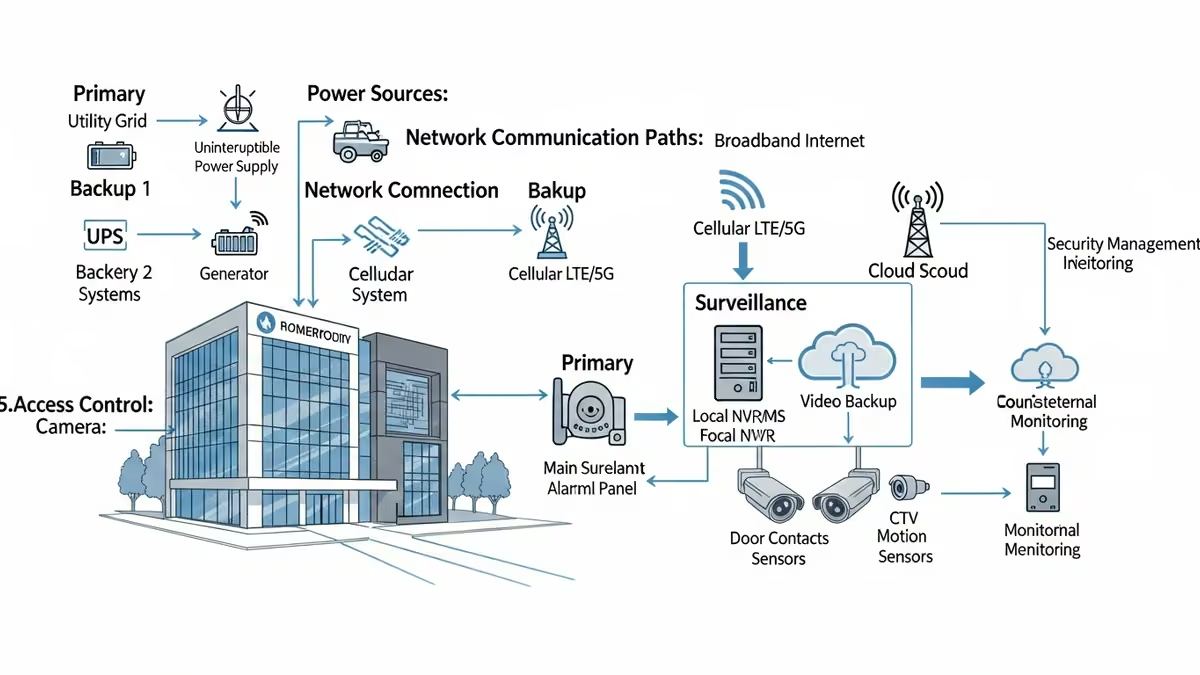
- Power redundancy: Multiple power sources (grid, backup generators, UPS systems)
- Communication redundancy: Dual network paths (hardwired and cellular backup)
- Equipment redundancy: Duplicate sensors, cameras, or control panels
- Data redundancy: Mirrored storage and cloud backup for surveillance footage
- Monitoring redundancy: Multiple monitoring centers or failover dispatch protocols
For mission-critical buildings—data centers, hospitals, financial institutions, and large commercial properties—redundancy isn’t a luxury. It’s a business continuity requirement.
Why Backup Power Is Critical for Uninterruptible Security
Power outages happen. Whether caused by severe weather, grid failures, or maintenance work, any loss of electricity can disable your entire security infrastructure in seconds. Backup power systems ensure your security system redundancy remains effective when the grid goes down.
Uninterruptible Power Supply (UPS) Systems
A UPS provides immediate power when the grid fails, with zero switchover time. Modern UPS systems for security applications typically offer:
- Instantaneous battery backup (no gap in power delivery)
- Runtime of 15 minutes to several hours depending on capacity
- Automatic voltage regulation to protect sensitive electronics
- Scalable capacity for growing security infrastructure
UPS systems work best for short-duration outages and as a bridge to longer-term backup power solutions. They’re ideal for keeping alarm panels, access control readers, and network equipment online during brief power disruptions.
Backup Generators for Extended Outages
For buildings that require hours or days of continuous security operation, backup generators are essential. Diesel, natural gas, or hybrid generators can power your entire security infrastructure indefinitely (as long as fuel is available). Key considerations:
- Automatic transfer switches: Seamlessly switch from grid to generator power
- Load management: Prioritize critical security systems over non-essential loads
- Fuel storage and rotation: Maintain adequate fuel reserves and refresh schedules
- Regular testing: Monthly or quarterly generator exercises ensure reliability
- Maintenance contracts: Professional servicing prevents unexpected failures
Many commercial buildings and multi-family properties combine UPS systems (for immediate response) with generators (for sustained operation), creating a layered backup power strategy.
Failover Protection: Automatic Switching When Systems Fail
Failover protection is the automated mechanism that switches your security system from a failed primary component to a working backup. Without failover, a single point of failure could disable your entire system. With it, your security remains uninterrupted.
Network Failover for Alarm Monitoring
Your alarm panel needs to communicate with the monitoring center. If your primary internet connection fails, a cellular backup connection automatically takes over. This ensures:
- Alarm signals reach the monitoring center even if broadband is down
- No gap in professional monitoring coverage
- Faster emergency response when needed
Modern cellular backup systems use independent networks, so even if your primary ISP experiences an outage, your alarm system remains connected and operational.
Camera and Surveillance Failover
Professional surveillance systems benefit from multiple failover strategies:
- Dual recording: Local NVR storage + cloud backup ensures footage isn’t lost
- Network redundancy: Cameras connect via primary and backup network paths
- Hot standby cameras: Secondary cameras automatically activate if primary units fail
- Distributed storage: Multiple storage locations prevent single-point data loss
For mission-critical surveillance, this multi-layered approach ensures continuous recording and accessibility even during component failures.
Access Control Failover
Smart locks and access control systems need failover protection too. Strategies include:
- Local credential storage: Readers retain access permissions offline
- Mechanical override: Manual key or code entry when electronics fail
- Dual-reader doors: Backup readers on critical access points
- Fail-safe vs. fail-secure modes: Doors unlock (fail-safe) or lock (fail-secure) based on your security posture
The right failover mode depends on your building type. A hospital might use fail-safe (unlock on power loss for emergency egress), while a data center might use fail-secure (lock down on failure to prevent unauthorized access).
Redundant Security Systems for Different Building Types
Commercial Buildings & Offices
Commercial properties typically need:
- UPS backup for alarm panels and access control readers
- Cellular backup for alarm monitoring
- Dual internet connections (primary ISP + cellular or secondary fiber)
- Cloud-based camera storage for surveillance redundancy
- Backup generator for extended outages
This combination ensures your office remains secure during brief outages and maintains operational continuity during extended power events.
Multi-Family Residential (Apartments & Condos)
Multi-dwelling properties face unique challenges: shared infrastructure, numerous access points, and resident safety concerns. Effective redundant security systems for multi-family buildings include:
- UPS systems for main entrance readers and intercom systems
- Cellular backup for alarm monitoring and emergency communication
- Distributed power backup (UPS units at key access points)
- Cloud storage for lobby and common area surveillance
- Backup generator for extended outages (especially in cold climates)
Residents expect uninterrupted access and safety, making failover protection essential for tenant satisfaction and property management efficiency.
Residential Homes
Even single-family homes benefit from basic security system redundancy:
- Battery backup in the alarm panel (standard in most modern systems)
- Cellular backup for alarm monitoring
- Cloud storage for doorbell and camera footage
- Battery-powered smart locks with manual override
For homeowners in areas prone to power outages, a small UPS system can extend alarm panel runtime and ensure continued protection during brief outages.
Key Components of a Redundant Security Architecture
1. Dual Power Sources
Primary grid power + UPS + generator creates a three-tier backup power strategy. Each layer handles different outage scenarios:
- Grid: Normal operation, lowest cost
- UPS: Immediate backup for brief outages (minutes to hours)
- Generator: Extended backup for prolonged outages (hours to days)
2. Redundant Communication Paths
Your alarm panel needs multiple ways to reach the monitoring center:
- Primary: Broadband internet connection
- Secondary: Cellular backup (LTE or 5G)
- Tertiary: Landline connection (where available)
This ensures that even if your primary internet provider experiences an outage, your alarm system remains connected and monitored.
3. Distributed Equipment & Hot Standby
For mission-critical buildings, consider:
- Redundant alarm panels: Primary and backup panels, with automatic failover
- Multiple monitoring centers: If your primary monitoring center goes offline, calls route to a backup facility
- Hot standby cameras: Secondary cameras ready to activate if primary units fail
- Distributed NVR storage: Multiple recording devices in different locations
4. Data Redundancy & Cloud Backup
Surveillance footage is only valuable if you can access it. Backup power keeps cameras recording, but data redundancy keeps footage safe:
- Local NVR storage for immediate access
- Cloud backup for off-site redundancy
- Automatic upload of critical footage
- Encrypted storage and access controls
If your local storage fails or is compromised, cloud backups ensure you still have evidence and operational records.
Designing Redundancy for Your Building: Best Practices
Conduct a Risk Assessment
Before implementing security system redundancy, understand your specific risks:
- How often does your area experience power outages?
- What’s the average outage duration?
- What are the consequences of security system downtime?
- Are there regulatory or insurance requirements for uptime?
- What’s your budget for redundancy infrastructure?
A hospital or data center might justify extensive redundancy, while a small retail space might focus on essential backup power and cellular monitoring backup.
Implement Layered Failover
Don’t rely on a single failover mechanism. Build multiple layers:
- Layer 1: UPS for immediate power backup
- Layer 2: Cellular backup for alarm monitoring
- Layer 3: Generator for extended outages
- Layer 4: Cloud storage for data redundancy
- Layer 5: Backup monitoring center for dispatch redundancy
Each layer handles a different failure scenario, ensuring comprehensive protection.
Test Your Failover Systems Regularly
A redundant system is only as good as its testing. Establish a maintenance schedule:
- Monthly: Test UPS battery backup (brief load test)
- Quarterly: Full generator exercise under load
- Semi-annually: Cellular backup activation test
- Annually: Comprehensive system failover drill
Regular testing identifies issues before they cause real-world failures and ensures your team knows how to respond when redundancy systems activate.
Document Your Redundancy Architecture
Create detailed documentation that includes:
- System diagrams showing all redundant components
- Failover procedures and automatic switching logic
- Contact information for monitoring centers and service providers
- Maintenance schedules and testing records
- Power calculations and UPS/generator capacity specifications
This documentation is invaluable for troubleshooting, training new staff, and demonstrating compliance to auditors or insurance providers.
Common Redundancy Mistakes to Avoid
- Assuming battery backup is enough: Alarm panel batteries typically last 24-48 hours. For longer outages, you need a generator.
- Neglecting communication redundancy: A powerful backup power system is useless if your alarm can’t reach the monitoring center.
- Skipping regular testing: Untested failover systems often fail when needed most. Test quarterly at minimum.
- Ignoring data redundancy: Backup power keeps cameras recording, but without cloud backup, footage can be lost to hardware failure.
- Over-specifying for your needs: A small retail space doesn’t need the same redundancy as a hospital. Right-size your investment.
- Failing to train staff: Your team needs to understand how redundancy systems work and what to do when they activate.
How Yanke Digital Designs Redundant Security Systems
At Yanke Digital, we understand that security system redundancy, backup power, and failover protection aren’t afterthoughts—they’re core design principles. Our approach includes:
- Custom assessment: We evaluate your building type, risk profile, and operational requirements to design appropriate redundancy.
- Integrated solutions: Our systems combine alarm monitoring, access control, surveillance, and environmental sensors with redundancy built in from the start.
- Professional installation: Proper installation of UPS systems, generators, and failover mechanisms is critical. We handle it right.
- Ongoing support: We provide maintenance, testing, and 24/7 support to ensure your redundant systems stay operational.
- Future-proof design: As your building evolves, your security system grows with it, maintaining redundancy at every stage.
Whether you’re securing a residential home, commercial building, or multi-family property, we design systems that keep you protected, even when things go wrong.
Ready to Build Redundancy Into Your Security System?
Don’t wait for a power outage to discover your security system isn’t prepared. Security system redundancy with backup power and failover protection is an investment in peace of mind and operational continuity.
Contact Yanke Digital today for a consultation. We’ll assess your building’s needs, design a redundant security architecture tailored to your requirements, and ensure your property stays protected 24/7, no matter what.
Call us at 1-888-698-8001 or schedule a consultation to discuss your security redundancy needs.